How to Choose a Photo for Custom Paint by Numbers
Most photos can be turned into a successful custom paint by numbers kit. Your source image does not need to be perfect: we review and prepare it by hand before production. This may include adjusting the crop and brightness or upscaling a low-resolution file.
Quick answer: the best photo has a clear main subject—a person, pet or meaningful place—shown close enough for the important details to remain visible. If you are unsure, you can usually upload the photo as it is. We will contact you before production if the crop or source image needs a decision from you.
When you are ready to choose the size and crop, visit our custom paint by numbers from your photo page.

Quick checklist for choosing a photo
- The main subject stands out: faces, eyes and other important features are not tiny in the frame.
- There is enough light: one side of a face is not lost in deep shadow and pale areas are not completely overexposed.
- The crop has room: important faces, ears, paws or other features are not cut off at the edge.
- The photo is not severely blurred: mild softness can be managed, but motion-blurred facial features cannot be recovered reliably.
- The canvas size fits the subject count: one person or pet needs less space than a large group.
Low resolution does not automatically rule out a photo
If the original file still exists, upload it instead of a screenshot or a compressed copy saved from a messaging app. The original normally contains more usable detail.
If a small or old image is the only version you have, it can still be worth using. We can upscale the file and adjust brightness and contrast. Upscaling cannot recreate details that were never captured, however. Eyes that are completely blurred or faces cropped out of the frame cannot be reconstructed with certainty.
Crop close enough to the important subject
A paint by numbers design simplifies a photograph into paintable colour areas. The smaller a face or other important subject appears in the source photo, the smaller its features will be on the canvas.
For portraits and pet photos, choose a crop where the face—and especially the eyes—can be seen clearly. In a group photo, every person needs more room, so removing unnecessary surroundings often gives the faces more space.
Lighting and contrast help preserve detail
Soft, even daylight is usually a good starting point. Strong backlighting can leave faces too dark, while a dark subject against a dark background may lose separation. A very pale subject against a pale background also needs enough tonal contrast.
We can adjust brightness and contrast by hand, so you do not need to edit the photo first. If you have several versions of the same picture, the original and least-filtered file is normally the best one to upload.
Match the canvas size to the number of subjects
A larger canvas gives small colour areas more physical space. For most photos of one person, one pet or a clear landscape, 40 × 50 cm is a practical starting point. For wedding, family and group photos, 60 × 80 cm or larger will normally preserve faces more clearly.

| Photo subject | Practical starting size | Why |
|---|---|---|
| One person or pet | 40 × 50 cm | The main subject has enough room to stand out. |
| A couple or a close photo of two people | 40 × 50 or 60 × 80 cm | The right size depends on the crop and amount of background. |
| Family, wedding or group photo | 60 × 80 cm or larger | There is more room for faces and clothing details. |
| Wide landscape or many small details | 60 × 80 cm or larger | Small paint areas are not packed as tightly. |
These are practical recommendations rather than fixed limits. The result also depends on the crop and which details matter most to you.
What do we adjust before production?
We do not rely on a fully automatic conversion. We review the source image before production and may:
- adjust the crop and composition to the selected aspect ratio
- improve brightness and contrast
- upscale a low-resolution image
- give the main subject more emphasis when the original contains a large amount of background
- contact you if the image, crop or canvas size needs to be agreed before production.
A custom kit uses up to 48 colours. The thousands of shades in a photograph therefore need to be grouped into paintable colour areas. The aim is not a pixel-for-pixel photo print, but a recognisable image that remains practical and enjoyable to paint.
Which photos need the most consideration?
- A distant group photo: crop unnecessary surroundings or choose a larger canvas.
- A very dark image: the original file helps, but brightness adjustments cannot always recover areas that contain no visible detail.
- Severe motion blur: choose another frame when the eyes or faces cannot be identified clearly.
- An important feature outside the frame: a missing edge or part of a face cannot be inferred reliably.
- A very busy background: decide whether the background matters or whether a closer crop would make the subject stronger.
Examples for different types of photo
Pet portrait
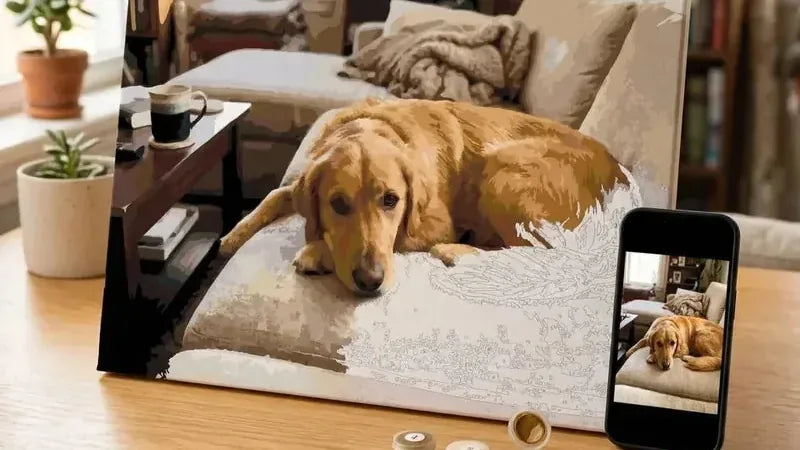
Choose a photo where the eyes are visible and there is tonal separation between the fur and the background. A close portrait of one pet often works well at 40 × 50 cm.
Wedding or couple photo
A close crop of two people can work at a smaller size. If the photo contains a large setting, guests or fine clothing details, a larger canvas gives those features more room.
Old photograph
Scan the photo as straight as possible in even light. Avoid flash glare and, when possible, remove the photograph from behind glass before copying it. A small file can be enlarged, but scratches and completely missing facial detail may still remain visible.
Landscape
Look for a clear composition and enough contrast between the foreground, background and main feature. Tiny branches, distant people and small building details will be simplified into paintable areas.
What happens after you upload the photo?
- Choose the canvas size and crop the image on the product page.
- We review and prepare the file by hand for production.
- If the source image or crop has a material issue, we contact you before production.
- The current production time for a custom kit is 1–3 business days before shipping.
Only upload an image that you have the right to use. The file is stored in the EU and deleted automatically 30 days after the order.
Frequently asked questions about photo selection
Can I use a photo taken with my phone?
Yes. The original file from a modern phone is normally suitable. Upload the original rather than a screenshot or a version reduced by a messaging app.
Is a small image automatically too poor?
No. We can often upscale and improve a small image. If important details are completely blurred or missing, however, enlargement cannot restore them reliably.
Can the crop or brightness be changed?
We can adjust the crop, brightness and overall separation during preparation. If you need a more substantial change, contact our customer service team before ordering.
Should I choose a ready-made design or my own photo?
A ready-made design is a simple choice, while your own photo makes the painting more personal. Compare the difference between ready-made and custom kits before deciding.
Ready to create a painting from your photo?
Choose the version where the subject that matters to you is shown as clearly as possible. We take care of the technical preparation and contact you if anything needs clarification. Once your kit arrives, follow our step-by-step paint by numbers instructions to get started.
